SEO Analytics and Reporting: What to Track and How to Act on It
Most SEO reports describe a symptom and stop. Here is what to track, which source answers which question, and how to route each finding to the file that fixes it.
On this page
- What SEO analytics and reporting actually covers
- The SEO metrics worth reporting
- Search engine rank reporting: what a ranking report should include
- Why most SEO reports never change anything
- How SEOAgent does SEO analytics and reporting
- A weekly SEO reporting routine for a small team
- When organic traffic drops
- Who this workflow is not for
- References
TL;DR — SEO analytics and reporting has two layers. Search performance (queries, clicks, impressions, CTR, position) comes from Google Search Console. Site health (indexing, crawlability, metadata, rendering, Core Web Vitals) comes from crawling and inspecting your own pages. A report is only useful when each finding names a page, a source, and the change that would fix it. For a site that lives in a repo, that change is a file, so the report should end in a diff your coding agent prepares and you review.
A developer notices a product page has stopped bringing in organic visits. The analytics chart shows the drop. It does not show the cause, which could be a title that no longer matches the query, a canonical tag pointing somewhere else, a route that started rendering empty, or simply a seasonal dip in demand. Each of those has a different fix, and only some of them are in your code.
That is the job of SEO analytics and reporting: collect the signals, separate the causes, and decide what to change. This guide covers the metrics worth tracking, where each one comes from, a reporting routine a small team can keep up, and how SEOAgent turns the findings into changes in your repository.
What SEO analytics and reporting actually covers
SEO data answers two different questions, and mixing them up is where most reports go wrong.
- Before the click: how does search see you? Which queries show your pages, how often, at what position, and how often searchers click. Google Search Console is the source of record here, because it reports Google's own data rather than a third-party estimate.
- After the click: what do visitors do? Engagement and conversions. Google Analytics (or any product analytics) answers this. Google's own guidance on using Search Console and Analytics together draws the same line.
Underneath both sits site health: can search engines crawl, render and index the pages your code produces? That layer has no traffic chart. You get it by inspecting your own URLs, and it is where most developer-fixable problems live.
The SEO metrics worth reporting
A useful report tracks a short list of metrics, each tied to an action. If a number moving would not change what you do next, leave it out.
| Metric | Source | What it tells you | What it usually triggers |
|---|---|---|---|
| Clicks and impressions per page | Search Console | Whether a page is gaining or losing search demand | Investigate the pages that moved, not the site total |
| CTR per query | Search Console | Whether the title and description earn the click at that position | Rewrite the title or meta description in the route file |
| Average position per query | Search Console | Pages close to page one (striking distance) | Strengthen the page: depth, internal links, intent match |
| Indexed vs. submitted URLs | Search Console URL Inspection | Pages Google has not taken | Fix canonicals, noindex, thin or duplicate content |
| Crawl and render state | Your own crawl of the live site | Missing titles, canonicals, H1s, structured data, empty client-rendered pages | Fix templates, metadata, or server rendering |
| Core Web Vitals (LCP, INP, CLS) | Search Console CWV report, PageSpeed Insights | Real-user loading and interaction problems | Optimize the largest image, font loading, or the render path |
| AI answer-engine citations | Prompt checks against AI answer engines | Whether AI answers cite you for your category | Add the facts, comparisons and structure answer engines quote |
Two rules keep this table honest. Report per page and per query, because a site-wide total hides the one route that broke. And annotate deploys: a CTR drop that starts the day a title template changed is a code change to review, not a mystery.
Search engine rank reporting: what a ranking report should include
A search engine ranking report answers one question: where do your pages appear for the queries you care about, and is that moving? Most rank reports fail by listing a position per keyword with no page, date range, or source attached. A ranking report you can act on carries five things per row:
- The query and the URL that ranks for it. Two of your pages trading places on one query is a cannibalisation problem, which a keyword-only report hides.
- Average position for this period and the previous one, over the same number of days. Search Console's position is impression-weighted across real searches, so a change of one or two places on a low-impression query is noise.
- Impressions and clicks next to the position. A gain from 14 to 9 that brings no new clicks means the snippet needs work, not the page.
- The source. Search Console reports what Google measured; a scraped rank tracker reports one location and device at one moment. Label which one each number came from and do not mix them in one column.
- The deploy or content change it lines up with, when there is one.
Backlinks belong in the same report only as context for a page that moved. Search Console's Links report is a sample, not a full index; how to read Google Search Console backlinks covers what it shows and what it leaves out.
Why most SEO reports never change anything
The typical monthly SEO report is a slide of charts with a paragraph of commentary. It describes symptoms well and stops before the fix, because the person reading it is rarely the person who can edit the route, the template or the sitemap generator.
For a site built in a repository, almost every technical SEO issue resolves to a file:
- A title or meta description problem lives in a route's metadata export or a layout template.
- A canonical or noindex problem lives in a shared head component or a framework default.
- A sitemap gap lives in the sitemap generator, often missing a newly added route.
- An empty render lives in a component that fetches content only on the client.
So the most useful format for a finding is not a chart. It is: this page, this evidence, this file, this proposed change. That is something you can review in a pull request.
How SEOAgent does SEO analytics and reporting
SEOAgent runs inside the coding agent you already use (Claude Code, Cursor, Codex), on your own model. The free Skill and local seoagent CLI gather the evidence and write it into .seoagent/ in your repo, so every later session builds on the last. Changes land as files your agent edits and you approve. SEOAgent does not publish anything for you.
The evidence comes from a few commands:
seoagent crawlcaptures the live state of your homepage and the pages in your sitemap and navigation: title, meta description, every H1, canonical, JSON-LD types, Open Graph and Twitter tags, missing image alt text, robots.txt, sitemap counts and client-render detection. It writes the result to.seoagent/audit/evidence.md, and audit claims are grounded in that file rather than guessed.seoagent indexingchecks which sitemap URLs Google has actually indexed, using Search Console's URL Inspection verdicts. It needs the freeseoagent loginto connect Search Console. The indexing checker page covers what it reports.seoagent sitemapvalidates the live sitemap for reachability, private routes that leaked into it, freshness, and public pages in the repo that are missing from it.seoagent internal-linksfinds orphan pages with no inbound internal links.seoagent citationstracks whether answer engines cite you, with history and share of voice. For background, see how to check your AI search visibility.
With the optional paid cloud tier, Search Console data flows into the dashboard. The Pages view breaks your landing pages down by clicks, impressions, CTR, average position and top query, and flags the ones in striking distance:
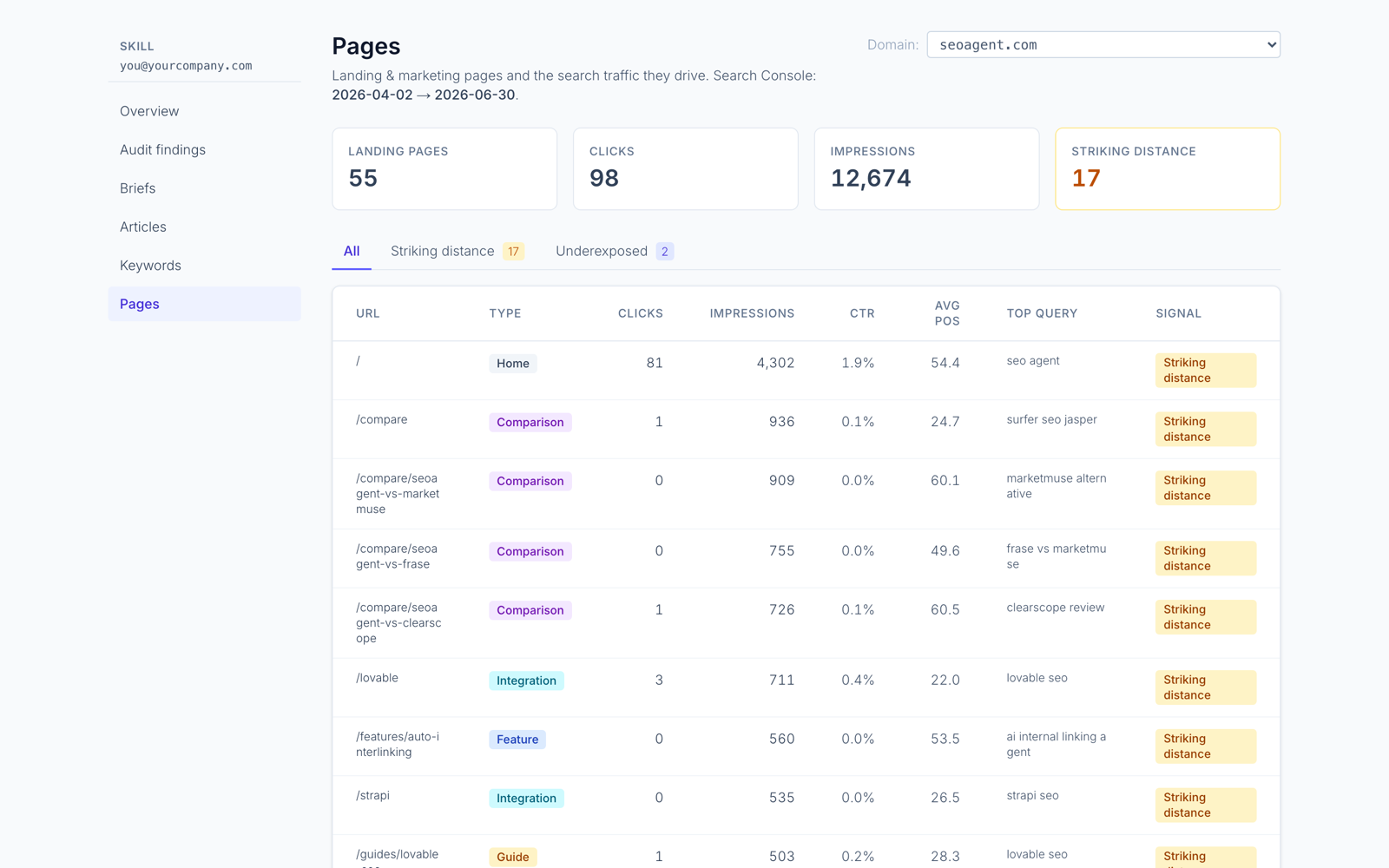
Positions come from Search Console rather than scraped results, which is the approach behind SEOAgent's rank tracking and its SEO keyword monitoring. The cloud tier also adds keyword and competitor research, and its autopilot turns findings into actions in your inbox: seoagent sync pulls them into .seoagent/inbox/, your coding agent implements each one in the repo, and seoagent ack closes it out. You still review every diff before it ships.
What SEOAgent does not do: it does not collect real-user Core Web Vitals. For LCP and the other vitals, read Search Console's Core Web Vitals report or PageSpeed Insights, then ask your agent to trace a slow LCP to the image, font or component that causes it.
A weekly SEO reporting routine for a small team
Monthly reports arrive too late to connect a drop to the deploy that caused it. A short weekly pass works better for a team that ships often:
- Refresh the evidence. Run
seoagent crawl(andseoagent indexingif Search Console is connected). Evidence older than a day describes a site you no longer have. - Read movement per page. Check which pages gained or lost clicks and impressions week over week. Ignore the site total until you know which pages drove it.
- Check what broke. Compare the crawl against last week's: new pages missing titles or canonicals, pages dropped from the sitemap, URLs Google stopped indexing.
- Turn each finding into a change. Ask your coding agent to locate the file that controls the problem and propose the edit. A finding that cannot name a file is not ready to act on.
- Review and ship normally. The fix goes through your usual pull request and checks. Note the deploy date so next week's numbers can be read against it.
Keep the written report to what changed, what you shipped, and what you are watching. That is a report someone will read.
When organic traffic drops
Before you change code, rule out the causes that are not in your code. Google's guide to debugging search traffic drops lists them: reporting glitches, seasonal demand, algorithm updates, manual actions and security issues, alongside site-side technical problems.
Then narrow it down:
- One page dropped, the rest held. Look at that page's recent commits, its canonical, its rendered HTML, and its indexing status. This is usually fixable in the repo.
- Impressions held, clicks fell. Position or CTR changed. Compare the title and description with the queries it now ranks for.
- Everything dropped on one day. Check robots.txt, site-wide noindex, redirects, and the deploy log for that date before assuming an algorithm update.
Crawling, indexing and serving are separate decisions, so a page can be live and still not be in Google. How often Google indexes websites covers how to tell which stage a page is stuck at.
Who this workflow is not for
- Teams that want a dashboard-only SEO product with no repository edits.
- Sites with no accessible codebase or no coding agent to make the changes.
- Anyone expecting SEOAgent to publish to a CMS: it does not, your agent edits the repo.
- Anyone looking for guaranteed rankings or traffic. No reporting tool can promise either.
If your site lives in a repo and you already work through a coding agent, start with the free Skill and CLI on that repo, run a crawl, and treat the first findings as review material. SEOAgent for Claude Code shows the setup, and the technical SEO checks page lists what the audit covers.
References
Put SEO on autopilot in your own editor
SEOAgent runs as a free skill inside Claude Code, Cursor, and Codex — on the model you already pay for. Audit, plan, and write SEO content right in your repo, with every change reviewed before it ships. No second AI subscription.
What do you use to work on your site?
Pick one above and we take you to the right setup.