Bulk Keyword Rank Checker: Check Hundreds of Rankings Without a Per-Keyword Bill
A bulk keyword rank checker can mean two different things: reading positions Google already measured, or scraping results for a keyword list. Here is when to use each.

On this page
TL;DR — "Bulk keyword rank checker" covers two different jobs. If you want positions for queries your site already appears for, pull them from the Google Search Console API: one request returns up to 25,000 query and page rows, with no per-keyword fee. If you need a position for a keyword Google has never shown your site for, or for a specific city or device, you need a SERP-scraping rank checker. Most sites need the first one daily and the second one rarely.
A common starting point: you have a spreadsheet of 300 target keywords and want to know where each one ranks today. Pasting them into a web form one at a time does not scale, and many bulk checkers charge by tracked keyword. The right approach depends on which keywords are on the list.
Two kinds of bulk rank checker
| Search Console data | SERP-scraping checker | |
|---|---|---|
| Where positions come from | Google's own measurement of your real impressions | A query run against Google from a chosen location and device |
| Which keywords it covers | Every query Google has shown your site for | Only the list you enter |
| Keyword you do not rank for yet | No row at all | Shows "not in top 100" |
| Position meaning | Impression-weighted average over the date range | One reading at one moment |
| Location and device | Filterable by country and device, not by city | Whatever you configure |
| Cost shape | Free API | Usually metered per keyword or per check |
Neither is "more accurate" in the abstract. They answer different questions. Search Console tells you how you are doing across the searches that actually happened. A scraper tells you what one searcher in one place would have seen for a keyword you picked.
Method 1: pull every ranking from the Search Console API
The Search Console Search Analytics API returns clicks, impressions, CTR and average position grouped by dimensions you choose. A request grouped by query and page looks like this:
{
  "startDate": "2026-09-27",
  "endDate": "2026-10-24",
  "dimensions": ["query", "page"],
  "rowLimit": 25000,
  "startRow": 0
}
Each row has keys (the query and the URL), clicks, impressions, ctr and position. rowLimit tops out at 25,000 per request, so page through with startRow until a response comes back short. The Search Console web UI, by comparison, only exports up to 1,000 rows, which is the usual reason people reach for the API.
To check a specific list, save the keywords one per line in keywords.txt, save the API response as rows.json, and filter:
import { readFileSync } from 'node:fs';

const wanted = new Set(
  readFileSync('keywords.txt', 'utf8').split('\n').map((k) => k.trim().toLowerCase()).filter(Boolean)
);
const { rows } = JSON.parse(readFileSync('rows.json', 'utf8'));

const hits = rows.filter((r: { keys: string[] }) => wanted.has(r.keys[0].toLowerCase()));
for (const r of hits.sort((a: any, b: any) => a.position - b.position)) {
  console.log(r.position.toFixed(1), r.impressions, r.keys[0], r.keys[1]);
}

const found = new Set(hits.map((r: { keys: string[] }) => r.keys[0].toLowerCase()));
console.log('No Search Console data for:', [...wanted].filter((k) => !found.has(k)));
The last line matters. Keywords with no row are the ones Google has not shown your site for in that range, which is useful information, but it is not the same as "ranks #101".
Reading the numbers
- Position is an average. It is weighted across impressions, so a query with three impressions at positions 4, 9 and 30 reports a blended number. Treat a one or two place move on a low-impression query as noise.
- Compare equal windows. Pull the last 28 days and the 28 days before, so a seasonal change does not look like a ranking change.
- Group by page too. If two of your URLs trade places on one query, a keyword-only report hides it.
- Mind the lag and the retention. Search Console data arrives a couple of days late and goes back about 16 months, so start storing your own snapshots early.
Method 2: a SERP-scraping bulk checker for the keywords Search Console cannot see
Use a scraper-based checker when:
- you are deciding whether to write a page, and want to know where you sit for a keyword before you have any impressions;
- you need a position in one city or on one device type;
- you want to monitor a competitor's URL for the same keyword list.
Limits to expect from any tool in this category: it checks only the keywords you add, each position is a single sample, results vary by location and personalization, and pricing usually scales with the number of keywords and the refresh frequency. Check the provider's terms too, since automated queries against Google results are against Google's terms and tools differ in how they source data.
Method 3: skip the list and let the data build it
If your real goal is "tell me when something moves", a keyword list is the wrong starting point, because you can only monitor what you remembered to type in. Starting from Search Console means the list builds itself from queries you already appear for, including ones you never targeted. Those are often the quickest wins: a query at position 11 to 20 with solid impressions is a page one edit away.
Where SEOAgent fits
SEOAgent is a Skill and CLI that runs inside your own coding agent (Claude Code, Cursor, Codex) on your own model, and edits files in your repo. You review every diff. It is not a standalone bulk rank checker, and it does not scrape search results.
What it does for rankings:
- With the optional paid cloud tier and a Search Console connection (
seoagent gsc connect), it syncs clicks, impressions and positions into a dashboard daily. There is no tracked-keyword cap on the position data, because it covers every query Google reports for your site. - It enriches your keyword inventory with search volume and difficulty and labels each keyword: easy win, striking distance, competitor gap. Rank tracking from Search Console and keyword monitoring cover that in detail.
- When a keyword is in striking distance or a page drops, the autopilot queues an action.
seoagent syncpulls it into.seoagent/inbox/, your agent makes the edit in the repo, andseoagent ackcloses it out. seoagent citationstracks whether AI answer engines cite you, which a classic position checker cannot show. See how to check your AI search visibility.
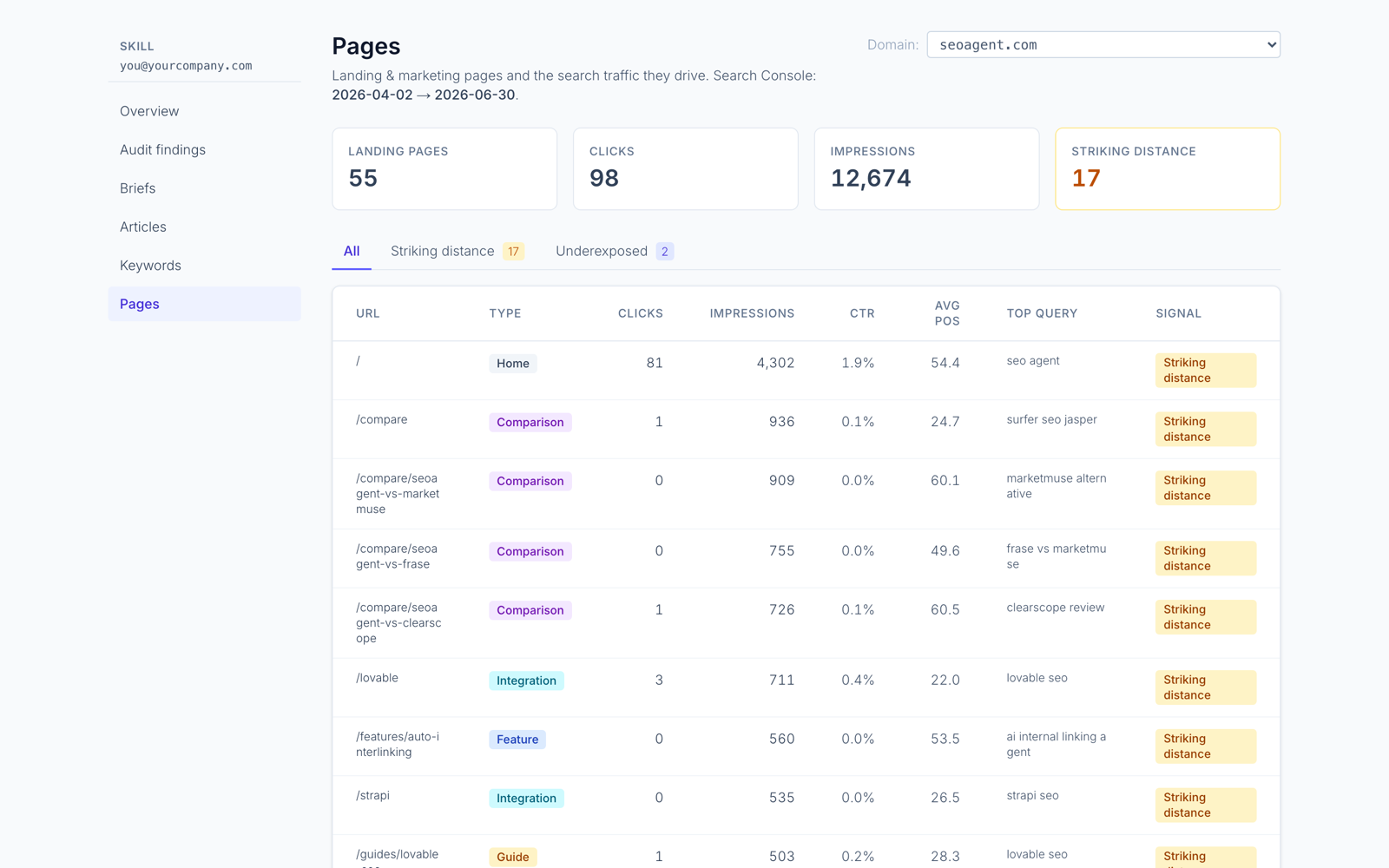
What it will not do:
- Report a position for a keyword where Google has never shown your site.
- Simulate rankings for a specific city or device.
- Work as a dashboard-only tool: it needs a coding agent and a repo.
- Replace a scraper if that is what you need. Use one alongside it.
Which approach to pick
- You want to know where you rank across everything, cheaply: Search Console API (Method 1).
- You have a target list of keywords you do not rank for yet: a scraper for those, then move to Search Console once impressions appear.
- You want rankings to turn into edits: read positions, find pages in striking distance, and have your coding agent revise the title, headings and internal links for those pages. SEO analytics and reporting shows how to structure that weekly pass.
No rank checker can promise a ranking or a timeline. It tells you where you stand, and what you do with that is the work. To try SEOAgent on a repo, start with the free Skill and CLI: SEOAgent for Claude Code.
References
Put SEO on autopilot in your own editor
SEOAgent runs as a free skill inside Claude Code, Cursor, and Codex — on the model you already pay for. Audit, plan, and write SEO content right in your repo, with every change reviewed before it ships. No second AI subscription.
What do you use to work on your site?
Pick one above and we take you to the right setup.