Semantic Search vs Keyword Search: How Each Works and What It Means for SEO
Keyword search matches terms. Semantic search matches meaning. Here is how each one works under the hood, where each breaks, and what it changes in the files you ship.
On this page
A visitor types "laptop won't wake up after closing the lid" into your docs search box. Your page is titled "Troubleshooting sleep and resume failures". It shares almost no words with the query. A keyword engine returns nothing useful; a semantic engine returns your page first.
The reverse failure is just as common. Someone searches for an error code, ERR_TLS_CERT_ALTNAME_INVALID, and a purely semantic engine returns loosely related pages about "certificate problems" instead of the one page that contains the exact string.
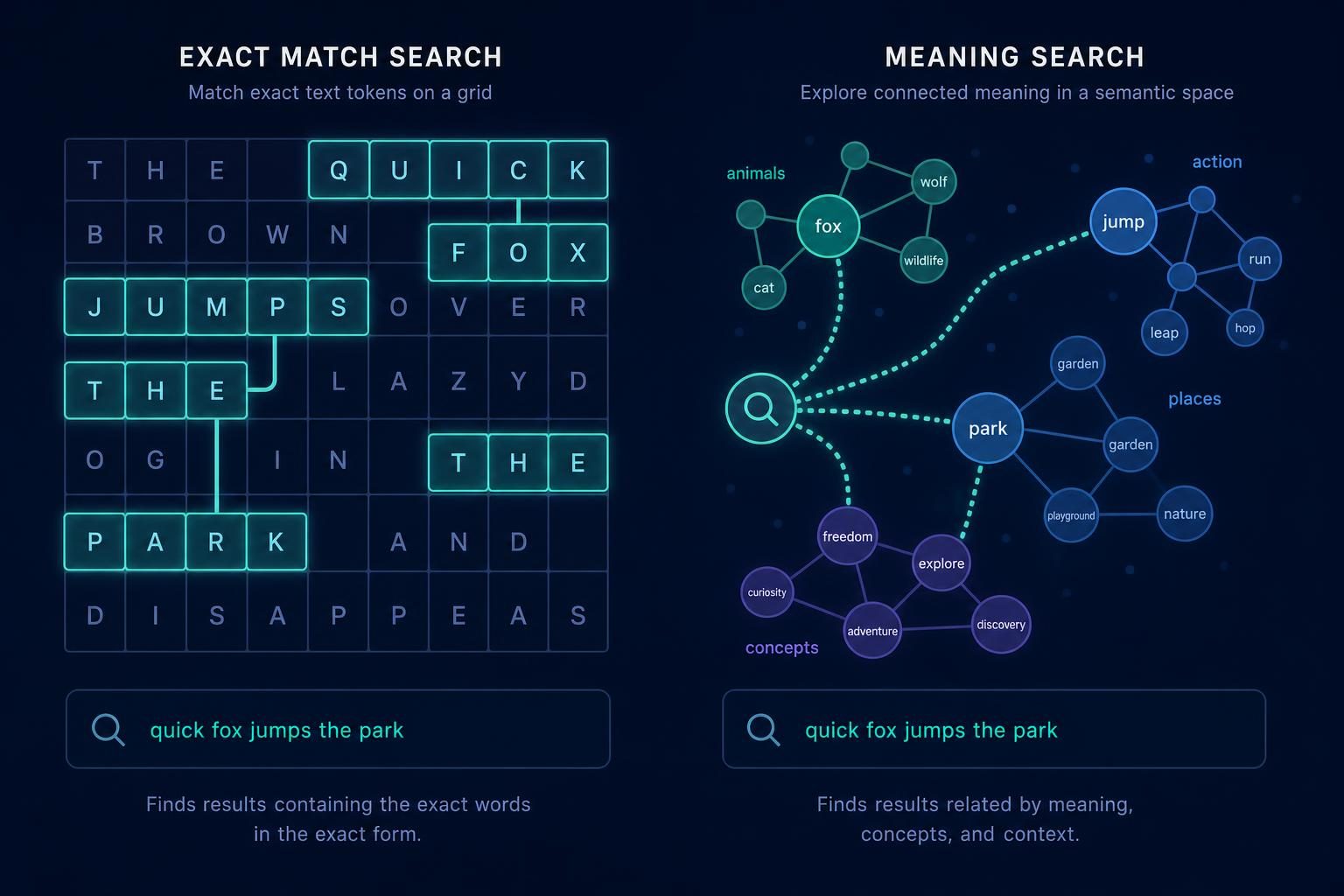
That is the whole semantic search vs keyword search debate in two examples. Keyword search matches the tokens you typed. Semantic search matches what you meant. This guide covers how each works, where each breaks, and what it means for the pages in your repository.
What is keyword search?
Keyword search (also called lexical search) finds documents that contain the query's terms. The usual implementation is an inverted index: for every token, a list of the documents that contain it. At query time the engine looks up each token, intersects or unions the lists, and ranks the results.
Ranking is typically a variant of TF-IDF or BM25. Both reward a document when the query term appears often in it and is rare across the whole collection, and BM25 adds term-frequency saturation and length normalization so long pages do not win by repetition alone.
What keyword search is good at:
- Exact strings: error codes, SKUs, function names, version numbers, product names.
- Predictability: you can explain why a result matched by pointing at the words.
- Speed and cost: no model is needed at query time.
Where it fails:
- Vocabulary mismatch: "cheap" versus "affordable", "sign in" versus "log in", "crash" versus "stops responding".
- Ambiguity: "python" the language and "python" the snake look identical to the index.
- Long, conversational queries: more words means more chances to match nothing.
What is semantic search?
Semantic search ranks documents by similarity of meaning. A language model converts the query and each document (or each passage) into an embedding, a vector of numbers placed so that texts with related meaning land near each other. The engine returns the nearest vectors, usually with an approximate nearest-neighbour index so it stays fast.
Because the comparison happens in meaning space, the query and the page need not share a single word. "Laptop won't wake up after closing the lid" lands near "Troubleshooting sleep and resume failures" because both describe the same problem.
What semantic search is good at:
- Synonyms and paraphrase: it bridges the vocabulary gap.
- Natural-language questions: it handles full sentences without needing keyword-style phrasing.
- Intent: it can separate "python install on Windows" from "python habitat" using the surrounding words.
Where it fails:
- Exact tokens: identifiers and codes get blurred into "something like this".
- Explainability: a similarity score of 0.82 does not tell you why a page ranked.
- Cost and operations: you need an embedding model, a vector index and a re-embedding step when content changes.
- Over-generalizing: the nearest neighbour is always something, even when nothing in the collection answers the question.
Semantic search vs keyword search at a glance
| Aspect | Keyword (lexical) search | Semantic (vector) search |
|---|---|---|
| Matches on | Tokens in the query | Meaning of the query |
| Core data structure | Inverted index | Embedding vectors + nearest-neighbour index |
| Typical ranking | TF-IDF, BM25 | Cosine or dot-product similarity |
| Handles synonyms | Only if you add them by hand | Yes, by construction |
| Handles exact codes | Yes | Weakly |
| Explainable | Yes: point to the matched words | Hard |
| Query-time cost | Low | Embedding call plus vector lookup |
Most production systems use both
The practical answer to "which is better" is usually "both, merged". Hybrid search runs a lexical query and a vector query, then fuses the two ranked lists. A common fusion method is reciprocal rank fusion (RRF), which needs no score calibration because it only uses ranks:
def rrf(rankings, k=60):
    scores = {}
    for ranking in rankings:            # e.g. [bm25_ids, vector_ids]
        for rank, doc_id in enumerate(ranking, start=1):
            scores[doc_id] = scores.get(doc_id, 0) + 1 / (k + rank)
    return sorted(scores, key=scores.get, reverse=True)
A page that ranks well in either list rises; a page that ranks well in both rises most. The exact-match error-code page and the paraphrased troubleshooting page both survive.
Web search engines work this way in spirit, too. Google has said publicly that it uses language-understanding models such as BERT to interpret queries, as described in its announcement of BERT in Search, while still relying on the words on the page and many other signals. Nobody outside the company knows the exact blend, so treat any claim of a specific weighting with suspicion.
What this means for SEO
Two things follow, and neither is a trick.
1. Exact-phrase repetition matters less; covering the topic matters more. If engines can match "affordable" to "cheap", writing the same phrase eleven times buys you nothing. A page that answers the question fully, with the entities, terms and follow-up questions a reader expects, is easier to match to the many ways people phrase it. See entity optimization for how to make those entities explicit and what is latent content for the terms a topic implies.
2. Keep the literal terms where literal terms are the query. Product names, error messages, API names, flags and version numbers should appear verbatim in headings and body text. These are exactly the queries where lexical matching still wins.
Practical changes you can make in a repository:
- Put the primary term in the title, the H1, the URL slug and the first paragraph, and state the question in plain language.
- Define the concept in one or two sentences near the top, then use the natural variants people use ("log in", "sign in") where they read naturally.
- Group queries by shared intent and give each group one URL. Semantic matching makes near-duplicate pages more likely to compete with each other, not less. The keyword strategy guide covers the mapping.
- Use headings that are self-contained questions or statements. Passage-level embeddings and AI answer engines both pull out sections, so a heading that makes sense alone helps. The AEO vs SEO article goes deeper on that.
- Put exact identifiers in code blocks or inline code so they stay verbatim and scannable.
Keyword research still has a job in a semantic world: it tells you which phrasings real people use and how much demand exists. Treat the output as a map of intents, not a list of strings to repeat. SEOAgent's keyword research works that way: it runs inside your coding agent, reads your repo and Search Console data, and writes the plan as a file you can review. It needs a coding agent such as Claude Code, Cursor or Codex, and the Search Console and keyword-data features are the paid cloud tier.
What this means for your own site search
If your product has a search box, the choice is an engineering decision:
- Small, structured, identifier-heavy content (API reference, SKUs, changelogs): start with lexical search. It is cheap and predictable.
- Prose-heavy content (help center, blog, docs with many how-to articles): add embeddings, since users ask in their own words.
- Mixed content: run hybrid and fuse with RRF. Evaluate on a list of real queries from your logs, with the page you would expect for each, before and after the change.
Re-embed pages when they change, store the model name next to each vector so you can detect stale embeddings after a model upgrade, and log zero-result and low-click queries. Those logs are also a source of content ideas, since each one is a question your pages did not answer.
Where a coding agent fits
Neither kind of search changes the workflow for the content itself: find the pages whose intent is unclear, tighten titles and headings, add the missing definitions and internal links, and review the diff. SEOAgent's skill runs on your own model inside your coding agent, edits those files in your repo, and every change goes through your normal review and deploy. It does not publish anywhere on its own.
Summary
- Keyword search matches tokens through an inverted index and BM25-style scoring. It is precise, explainable and weak on vocabulary mismatch.
- Semantic search matches meaning through embeddings and nearest-neighbour lookup. It handles paraphrase and natural questions and is weak on exact identifiers.
- Hybrid search combines both and is the common default for production systems.
- For SEO, write for the topic and the reader's question, and keep literal terms verbatim where people search for literal terms.
References
- Okapi BM25 (Wikipedia)
- Understanding searches better than ever before (Google, on BERT in Search)
- SEO Starter Guide: The Basics (Google Search Central)
Put SEO on autopilot in your own editor
SEOAgent runs as a free skill inside Claude Code, Cursor, and Codex — on the model you already pay for. Audit, plan, and write SEO content right in your repo, with every change reviewed before it ships. No second AI subscription.
What do you use to work on your site?
Pick one above and we take you to the right setup.