Google Keyword Rank Checker API: What Exists, What It Returns, and How to Call It
There is no Google API that returns "where do I rank for this keyword". There are two substitutes: Search Console data and scraped SERP results. Here is how each one works.
On this page
TL;DR — Google does not offer an API that takes a keyword and returns your position on the results page. Two things stand in for it. The Search Console Search Analytics API returns average positions for queries Google has already shown your site for, and it is free. A third-party SERP API runs a live search for any keyword you send and returns the results it saw, usually billed per request. Use Search Console for the keywords you already appear for and a SERP API for the ones you do not.
If you searched for a "Google keyword rank checker API", you probably want one of two things: a script that reports positions for a keyword list, or a rank-tracking feature inside your own product. Both are buildable, and the choice of data source decides what the script can and cannot tell you.
The two data sources
| Search Console API | Third-party SERP API | |
|---|---|---|
| Provider | Commercial providers (DataForSEO and SerpApi are two examples) | |
| What you send | A date range, dimensions and filters | A keyword, a location, a language and a device |
| What you get back | Clicks, impressions, CTR, average position per query and page | The ranked results for that one search, which you scan for your domain |
| Keyword you have no impressions for | No row | Returns the results; your domain is simply absent from the top N |
| Position meaning | Impression-weighted average over the range | One sample at one moment |
| Location | Country filter, no city | City level, depending on the provider |
| Auth and cost shape | OAuth or service account, free | API key, usually metered per request |
Check each provider's current docs and terms before you build on it. Fields, rate limits and pricing change, and automated querying of Google results is something providers handle differently.
Option 1: the Search Console Search Analytics API
The endpoint is searchAnalytics.query. This request returns every query and page pair for a date range, filtered to a single keyword:
curl -X POST \
  "https://www.googleapis.com/webmasters/v3/sites/https%3A%2F%2Fexample.com%2F/searchAnalytics/query" \
  -H "Authorization: Bearer $ACCESS_TOKEN" \
  -H "Content-Type: application/json" \
  -d '{
    "startDate": "2026-09-27",
    "endDate": "2026-10-24",
    "dimensions": ["query", "page"],
    "dimensionFilterGroups": [{
      "filters": [{
        "dimension": "query",
        "operator": "equals",
        "expression": "google keyword rank checker api"
      }]
    }],
    "rowLimit": 25000
  }'
Each row in the response carries keys (the query and the URL), clicks, impressions, ctr and position. To check a list, drop the filter, request up to 25,000 rows per call and page through with startRow, then match your keywords locally. The longer walk-through, including a filtering script, is in the bulk keyword rank checker guide.
What to know before you rely on it:
- No row means no impressions. A keyword missing from the response has not been shown to searchers in that range. It does not mean position 101.
- Position is an average. Three impressions at positions 4, 9 and 30 report one blended number, so small moves on low-impression queries are noise.
- Data is delayed and limited in history. Expect a lag of a couple of days and roughly 16 months of history. If you want longer trends, write each day's pull to your own storage.
- Access needs a verified property. You can only query sites where your Google account or service account has been granted access in Search Console.
Option 2: a SERP API for keywords you do not rank for yet
A SERP API fits when you need a position before any impressions exist, or when you need a city or device. The request shape is similar across providers: keyword, location, language, device, and a depth such as the top 100. Your code then looks for your domain in the returned list. The generic pattern, with the provider call left as a placeholder for whichever service you choose:
type SerpItem = { rank: number; url: string };

async function checkRank(keyword: string, domain: string): Promise<number | null> {
  // Replace with your provider's SERP request: keyword + location + language + device.
  const results: SerpItem[] = await fetchSerpResults(keyword);

  const hit = results.find((r) => new URL(r.url).hostname.endsWith(domain));
  return hit ? hit.rank : null; // null means outside the depth you requested
}
Limits to plan around:
- Each call returns one sample. Positions shift with location, personalization and SERP features, so run checks on a schedule and compare the trend rather than a single reading.
- Cost scales with keywords times check frequency times depth. Ten thousand keywords checked daily is a very different bill from two hundred checked weekly.
- Results pages include features such as AI Overviews and featured snippets. Confirm which of these your provider reports, since "position 3" can sit far down the page.
Combining both
A practical setup uses the free source first. Pull Search Console daily and store the rows. Query a SERP API only for the target keywords that have no Search Console row yet, and stop paying for those once impressions show up. That keeps the metered spend on the narrow set of keywords where Google has not given you data.
Where SEOAgent fits
SEOAgent is a Skill and CLI that runs inside your own coding agent (Claude Code, Cursor, Codex) on your own model, and edits files in your repo. You approve every change. It is not a rank checker API and it does not expose one: there is no endpoint to call with a keyword list, and it does not scrape search results.
What it does with ranking data:
- The optional paid cloud tier connects Search Console (
seoagent gsc connect) and syncs clicks, impressions and positions daily into a dashboard. The position data covers every query Google reports for your site, so there is no tracked-keyword cap. - It enriches your keyword inventory with search volume and difficulty and labels each keyword: easy win, striking distance, competitor gap. See rank tracking from Search Console and keyword monitoring.
- When a page lands in striking distance or drops, the autopilot queues an action.
seoagent syncpulls it into.seoagent/inbox/, your agent edits the page in your repo, andseoagent ackcloses it out.
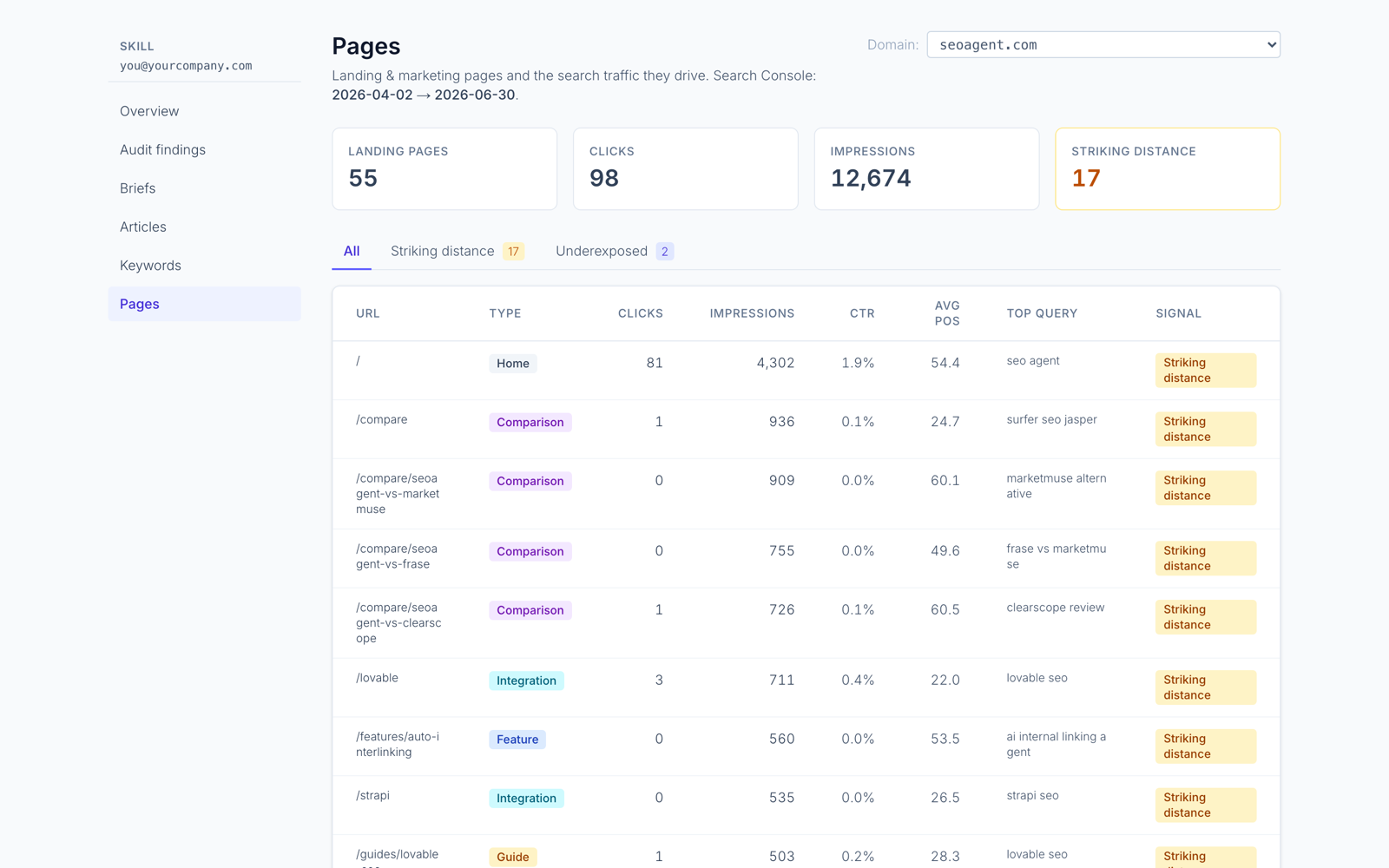
Its limits: it needs a coding agent and a repo, it has no dashboard-only workflow, the cloud data is a paid tier, and it reports no position for a keyword where Google has not shown your site. If you need city-level checks or a rank API to embed in your own product, use a SERP API alongside it.
Which one to build on
- You want positions for the queries your site already earns: Search Console API. It is free and covers everything Google measured.
- You are validating a keyword before writing a page: a SERP API for that list, then switch to Search Console once impressions appear.
- You want the positions to produce edits: feed the Search Console rows into a weekly pass that finds pages at positions 11 to 20 and revises their titles, headings and internal links. SEO analytics and reporting describes that pass.
No rank checker can promise a ranking or a timeline. To try SEOAgent on a repo, start with the free Skill and CLI: SEOAgent for Claude Code.
References
Put SEO on autopilot in your own editor
SEOAgent runs as a free skill inside Claude Code, Cursor, and Codex — on the model you already pay for. Audit, plan, and write SEO content right in your repo, with every change reviewed before it ships. No second AI subscription.
What do you use to work on your site?
Pick one above and we take you to the right setup.