How to Create a robots.txt File Online (and Keep It in Your Repo)
An online robots.txt generator gets you a first draft in a minute. Here is how to build the file, what each directive does, where it has to live, and how to test it before a bad rule blocks your site.
On this page
- What an online robots.txt generator actually does
- Step 1: Decide what to block (and what not to)
- Step 2: Write the directives
- A typical file for a SaaS or content site
- Rules for AI crawlers
- Step 3: Save it with the right name and encoding
- Step 4: Put it at the root of the host
- Step 5: Test it before and after you deploy
- Common mistakes
- Keep it in your repo, not just in a web form
- Frequently asked questions
- How do I create a robots.txt file for free?
- Where do I put the robots.txt file?
- Is robots.txt required?
- Does robots.txt stop a page from appearing in Google?
- Can I use robots.txt to block AI crawlers?
- How do I test my robots.txt file?
- Conclusion
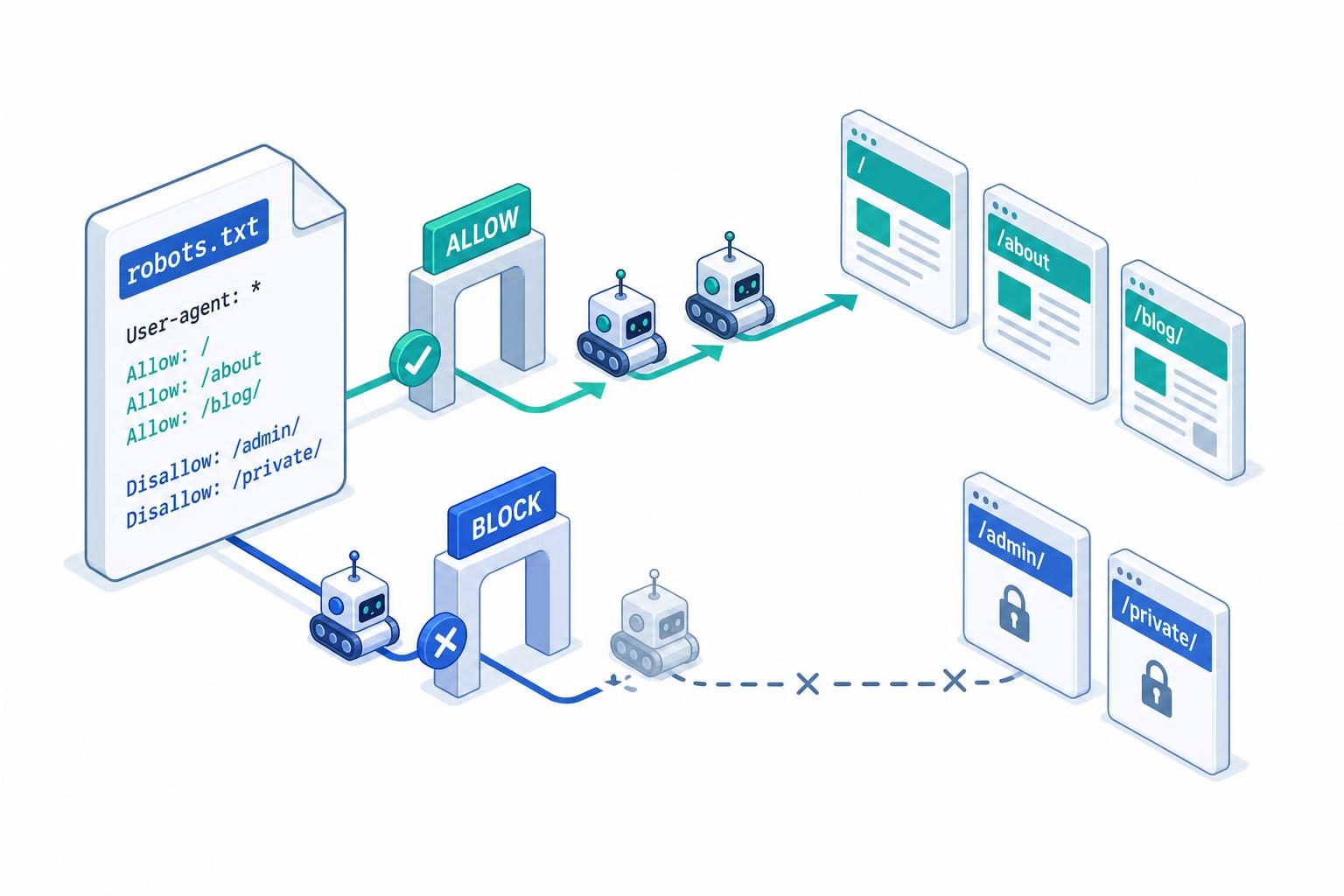
TL;DR — A robots.txt file is a plain-text file served at https://yourdomain.com/robots.txt that tells compliant crawlers which paths they may request. To create one online, choose your rules in a generator (or just type them in a text editor, since the syntax is five directives), add a Sitemap: line, save it as robots.txt in UTF-8, upload it to your site root, and test it. Then commit the file to your repo so it is versioned like the rest of your code.
You don't need special software. The file below is a complete, valid robots.txt:
User-agent: *
Disallow: /admin/
Disallow: /api/

Sitemap: https://example.com/sitemap.xml
It says: every crawler may fetch anything except /admin/ and /api/, and the XML sitemap lives at the listed URL. The rest of this guide covers building a file that fits your site, avoiding the mistakes that deindex pages, and testing before you ship. It pairs with what crawling means in SEO if you want the background on how crawlers use the file.
What an online robots.txt generator actually does
An online generator is a form that writes text for you. You tick which bots to allow or block, enter paths to disallow and your sitemap URL, and it outputs a file to copy or download. That's all it does, and it's useful for two reasons: it prevents syntax typos on a first draft, and it reminds you of directives you might forget (like the sitemap line).
What a generator cannot do:
- Know your site. It doesn't know that
/search?q=pages are thin or that/checkout/should stay private. You supply the paths. - Upload the file. You still have to put it at the root of your host.
- Verify the result. Google's own tooling tells you whether the file was fetched and parsed. A generator doesn't.
If your site has a handful of rules, typing the file by hand is as fast as filling in a form. Use a generator when you want a template to start from.
Step 1: Decide what to block (and what not to)
Start from the reverse question: what shouldn't a crawler spend time on? Typical candidates:
- Admin and login areas (
/admin/,/wp-admin/) - API routes and internal endpoints (
/api/) - Cart, checkout, and account pages
- Internal search results and endless filter/parameter combinations
- Staging or preview paths
And what should stay open: your content, your CSS and JavaScript files (Google renders pages, and blocked assets can break that rendering), and your sitemap.
One distinction matters more than anything else in this guide: robots.txt controls crawling, not indexing. A URL blocked in robots.txt can still appear in search results if other pages link to it, just without a description. To keep a page out of the index, use a noindex meta tag or X-Robots-Tag header and leave the page crawlable so the directive can be read. Blocking a page in robots.txt hides its noindex from the crawler.
Step 2: Write the directives
The core syntax is small:
| Directive | What it does |
|---|---|
User-agent: |
Starts a group and names the crawler it applies to. * means all crawlers that don't match a more specific group. |
Disallow: |
A path prefix the crawler should not request. An empty value means nothing is disallowed. |
Allow: |
A path prefix that is permitted, used to carve an exception out of a broader Disallow. |
Sitemap: |
The absolute URL of an XML sitemap. Not tied to a user-agent group; you can list several. |
A few rules of matching that trip people up:
- Paths are prefix matches and case-sensitive.
Disallow: /privatealso blocks/private-notes. Add a trailing slash (/private/) if you mean the directory. - Google supports
*(any characters) and$(end of URL) in paths, for exampleDisallow: /*.pdf$. - When
AllowandDisallowboth match, Google uses the most specific (longest) rule. On a tie, it picks the less restrictive one,Allow. - A crawler follows only the single most specific
User-agentgroup that matches it, not a merge of*plus its own. If you write aGooglebotgroup, Googlebot ignores the*group entirely, so repeat the rules it should still follow. Crawl-delayis ignored by Google. Some other crawlers honor it.- A
noindexline insiderobots.txtis not supported by Google. Don't rely on it.
A typical file for a SaaS or content site
User-agent: *
Disallow: /api/
Disallow: /admin/
Disallow: /checkout/
Disallow: /search
Allow: /api/public/

Sitemap: https://example.com/sitemap.xml
Rules for AI crawlers
Generators increasingly offer per-bot toggles for AI crawlers. Each vendor publishes its own user-agent token, so check the vendor docs for the current names. Commonly cited ones include GPTBot and OAI-SearchBot (OpenAI), ClaudeBot (Anthropic), PerplexityBot (Perplexity), CCBot (Common Crawl), and Google-Extended (a Google control token for AI training use, separate from Googlebot).
User-agent: GPTBot
Disallow: /

User-agent: Google-Extended
Disallow: /
Decide on purpose. Blocking a training crawler is a different decision from blocking a search or answer crawler, and blocking the latter can remove you from AI answers you might want to appear in. robots.txt is also advisory: well-behaved bots follow it, and others may not. For the visibility side of that trade-off, see how to get cited by Perplexity and how to rank on ChatGPT. For the legal and ethical angle on crawlers that ignore the file, see is web crawling legal.
Step 3: Save it with the right name and encoding
- The filename is exactly
robots.txt, lowercase. - Save as plain text, UTF-8. No Word processor formatting, no BOM-dependent tricks.
- Keep it small. Google processes only the first 500 KiB, and content past that limit is ignored.
Step 4: Put it at the root of the host
The file only works at the root of the host it governs:
https://example.com/robots.txtapplies toexample.com.- It does not apply to
https://blog.example.com/, which needs its own file. - Protocol and port count too:
http://andhttps://are treated as separate origins, so make sure the file resolves on the canonical one (a redirect from HTTP to HTTPS is fine). - A file in a subfolder like
/blog/robots.txtis ignored.
How you place it depends on your stack:
- Static host or plain server: put
robots.txtin the web root (public/for most frameworks). - WordPress: the platform serves a virtual
robots.txtby default; a physical file in the root overrides it, and many SEO plugins edit it for you. - Next.js App Router: add
app/robots.tsand let Next serve it.
// app/robots.ts
import type { MetadataRoute } from 'next';

export default function robots(): MetadataRoute.Robots {
  return {
    rules: [
      { userAgent: '*', allow: '/', disallow: ['/api/', '/admin/'] },
      { userAgent: 'GPTBot', disallow: '/' },
    ],
    sitemap: 'https://example.com/sitemap.xml',
  };
}
Generating the file from code means the sitemap URL and rules can't drift from what the app actually serves. The Next.js sitemap guide covers the sitemap half of this setup, and Next.js SEO puts both in context.
Step 5: Test it before and after you deploy
A one-character mistake in robots.txt can block your entire site. The classic is:
User-agent: *
Disallow: /
That's the staging-site rule that gets copied to production. Check these things every time:
- Fetch it in a browser. Open
https://yourdomain.com/robots.txt. It should return HTTP 200 and plain text, not an HTML error page or a redirect to a login. - Check Google Search Console. Under Settings → Crawling → robots.txt, the report shows which
robots.txtfiles Google found, when it last fetched them, and any parsing errors or warnings. The URL Inspection tool tells you whether a specific URL is blocked byrobots.txt. - Test specific URLs. Pick your most important page, one page you intend to block, and one
Allowexception, and confirm each behaves as expected. A third-party robots.txt tester or a small script using a parser library can do this offline. - Re-check after every deploy that touches it. Environment-specific config is where a staging
Disallow: /sneaks into production.
If a fix isn't being picked up, remember that Google caches robots.txt and generally refreshes it within about a day, so changes aren't instant. For the related question of how quickly new pages are picked up after the file is right, see how often Google indexes websites.
Common mistakes
- Blocking CSS and JS. If Google can't fetch your assets, it may not render the page the way users see it.
- Using
robots.txtas a privacy tool. The file is public and lists exactly the paths you want to hide. Protect private content with authentication, not aDisallow. - Trying to deindex with
Disallow. As above, blocked URLs can remain in the index. Usenoindexon a crawlable page, or remove the URL through Search Console. - Relative sitemap URLs. The
Sitemap:value must be a full absolute URL. - Forgetting subdomains. Each host has its own file.
- Conflicting groups. Remember that a crawler uses only its most specific group.
Keep it in your repo, not just in a web form
The reason to "create robots.txt online" and then stop at copy-paste is that the file ends up living in a dashboard, a hosting panel, or someone's clipboard. A robots.txt is configuration that changes your search visibility, so treat it like code: commit it, review diffs, and let the staging-versus-production difference be explicit.
This is where SEOAgent fits for developers. It runs on your own model inside your coding agent and edits files in your repo, with every change gated on your approval. It has no CMS publishing step. For a robots.txt, that means the agent can read your current file or app/robots.ts, compare it against your routes and sitemap, and propose an edit as a normal diff for you to review and merge. Limits worth knowing: it needs a coding agent to run in, and it won't replace Search Console, which is still the source of truth for how Google fetched and parsed the file. For the wider workflow, see SEO for developers.
Frequently asked questions
How do I create a robots.txt file for free?
Open any plain-text editor, write your User-agent, Disallow, Allow, and Sitemap lines, save as robots.txt in UTF-8, and upload it to the root of your site. Online generators produce the same text from a form, and most are free.
Where do I put the robots.txt file?
At the root of the host: https://example.com/robots.txt. Subfolder locations are ignored, and each subdomain needs its own file.
Is robots.txt required?
No. Without one, crawlers assume everything is allowed (a missing file returning 404 is treated as no restrictions). You need one when you want to keep crawlers out of specific paths, or to declare your sitemap location.
Does robots.txt stop a page from appearing in Google?
Not reliably. It stops compliant crawlers from fetching the page, but the URL can still be indexed from external links. To keep a page out of results, use noindex and leave it crawlable.
Can I use robots.txt to block AI crawlers?
You can add Disallow rules for each AI crawler's user-agent token, and well-behaved bots will honor them. It's advisory, so it doesn't stop bots that ignore the standard, and blocking answer or search crawlers can reduce your presence in AI answers.
How do I test my robots.txt file?
Load it in a browser to confirm a 200 response, check the robots.txt report in Google Search Console, and test a few representative URLs with URL Inspection or a robots.txt parser. Re-test after every deploy that changes it.
Conclusion
Creating a robots.txt online takes a minute; getting it right takes a decision about what you want crawled. Write the few directives you need, point to your sitemap, put the file at the host root, and test it in Search Console. Then keep it in version control so a staging Disallow: / never reaches production unnoticed. For the crawling fundamentals behind all of this, read what crawl means in SEO.
Put SEO on autopilot in your own editor
SEOAgent runs as a free skill inside Claude Code, Cursor, and Codex — on the model you already pay for. Audit, plan, and write SEO content right in your repo, with every change reviewed before it ships. No second AI subscription.
What do you use to work on your site?
Pick one above and we take you to the right setup.